







This procedure for installing a PC ATI Radeon HD 6870 Video Card into a Mac Pro works for Mac OS Yosemite, Mavericks, Lion, and El Capitan. Starting with Mac OS X Lion, you don’t have to load the driver, Mac OS X includes the necessary ATI Radeon HD 6870 drivers required for a Mac Pro. Unlike supported cards, the screen still starts out black while the OS is booting.
Install ATI Radeon HD 6870 Video Card into Mac Pro Details
The default video card, GeForce 8800 GT, in my Mac Pro 3,1 Early 2008 wasn’t performing well for games, so I decided to replace it. After extensive research, I decided on the ATI Radeon HD 6870 1 GB 256-bit GDDR5 PCI Express Twin Frozr II. This card, built on the ATI Radeon HD 6870 platform, has far superior performance to the Apple default GeForce card. It is most likely the quietest card due to the large heat sinks and two fans (instead of 1 like most video cards), and has two DVI, two mini DisplayPort, and an HDMI port. Customer comments confirmed it was quiet and ran cool. More reviews confirmed it ran on the Mac Pro 3,1 (Mac Pro early 2008 running 10.6.7). Now that it is finally working, I can attest that it is a silent card, as quiet as the GeForce 8800 GT that it replaced. Below I explain what it takes to get the card working.

Installed MSI HD R6870 Twin Frozr II
After the card had arrived, I realized the sites I had reviewed were from people booting Windows natively on their Mac Pros. I had no idea so many people are running Windows on the Mac Pro. I spent the next several hours trying to find out how to get this card working. I read articles on how to flash it, various articles on downloading a variety of programs to change parts of Mac OS to get the card working. Finally, after extensive searching, I found the drivers. This posting is a “how-to” guide and hopefully easier to find than the posting where I downloaded the drivers. Note, these drivers aren’t required after Mac OS X Lion.
The best price I found for the MSI R6870 was on Amazon, and you need to order the PCIe PCI-e Power Cable from Amazon along with it.
If you are running Yosemite, you can download and install the drivers while you wait for the Amazon order to arrive.
The GeForce 8800 has a power cable that runs from the motherboard to the video card. You will notice that there are two 6 pin connectors on the motherboard right next to each other (visible in the top left corner of the picture below). The new cable will plug into the empty connector to provide two power cables to the new card.
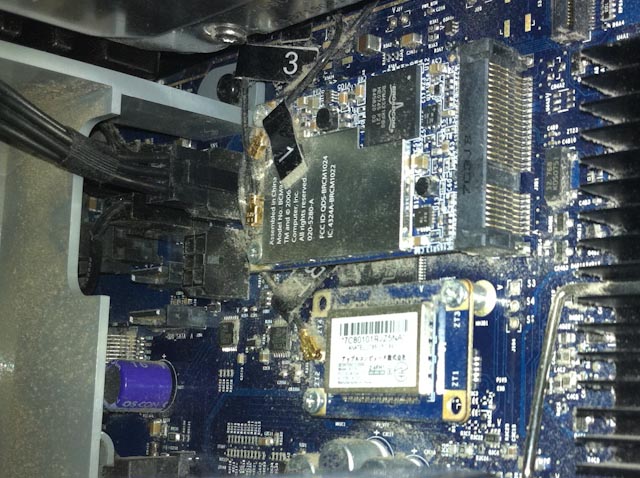
Disconnect the power cable, unscrew the bar that holds the PCIe cards in place, and pull out the 8800 video card. Note that on the PCIe connector on the motherboard there is a plastic catch that you will need to pull up to remove the card. If you don’t, you will break this off. Not the end of the word, but not ideal.
Remove the blue plastic cover over the PCIe connector before installation. Slide the new video card into the bottom slot. Connect the two power cords and replace the bar that holds the PCIe cards in place. Close up the Mac and turn on.
When booting you don’t see the standard boot screen. The screen stays black until the Mac is booted then you see the login screen.
All done!
ATI Radeon 6870 Results
I knew I made the right decision when I cranked up the World Of Warcraft video setting to Ultra, and it worked without any tearing or jumping. The 8800 has 512M of video memory opposed to the ATI Radeon HD 6870 which has 1G. iStat Menus 5 shows that, while WOW is running, more than 50% of the video memory was in use. Since the GeForce card had only 512M, I am sure it was running out.




Thanks for the info!!! I found this page recently via Google search. I have the same model Mac Pro & recently installed the same video card.
It works fine, but I have some concerns dues to the absence of a boot screen. Have you tried using Boot Camp for one of the hard drives? I want to install Windows 7 on one hard drive in order to play some Windows PC games, but I am a little worried that I may not be able to boot back into Lion afterward. Any thoughts or experiences with this?
Any help would be greatly appreciated!!
Hi,
Thanks for letting me know you where successful with the installation.
I don’t know about boot camp working with the 6870. However you have given me a challenge to find out. Check back after the weekend. I will test it out.
Have you thought about using vmware or Parallels? I use vmware with this card just fine.
Marke
Hi Marke,
I thought about VMware Fusion, but wouldn’t that diminish some of the performance vs. running the Windows OS directly?
Have you run any high-end PC games using Fusion? I am currently using Fusion for QuickBooks & ProSeries tax software, but I haven’t tried running the more demanding gaming apps.
Please let me know the results if you do decide to experiment with Boot Camp.
Thanks again,
Jeremey
I haven’t tried high end PC games in VMWARE, but I am sure it is slower than bootcamp. There is a good article on Bootcamp vs Parallels by Ed Bott on ZD Net and another in-depth Bootcamp vs Parallels by Sandro Villinger at ITWorld.
I checked out the first link and it pretty much confirms what I had already suspected – the graphics performance takes a hit using virtual environments. My main concern now is just being able to switch back and forth between Boot Camp & Lion. I guess the worst case scenario would force me to reinstall the old video card in order to get the boot screen to come up?
Did you have an opportunity to experiment with this setup at all?
I’d like to go this route as well, if only to gain decent OpenCL acceleration at a reasonable upgrade price. Is there any issue with subsequent system/OS updates (drivers being deleted and the like)?
Note, for what switching back and forth between Bootcamp and OS X concerns, you don’t need the boot screen, selecting the boot partition in the Startup/Bootcamp control panel should be enough.
I’m using a XFX 6870 – flashed it with a custom ROM (regular + EFI-Part). Card works great but there are a few issue:
1. On MacPro 3,1 the card mounts only as PCIe 1,1 (both OSX and Windows) – regardless if the card is flashed or not! Should be PCIe 2.0. You can check this in the system profiler, PCIe 1,1 = 2.5GT/s, 2.0 = 5GT/s
2. Systems (iMac, MacBook, MacPro) with Radeon 4xxx, 5xxx and 6xxx have an issue in Lion 10.7.3: low gfx-performance after sleep mode, approx. only 1/3 of the usual performance.
3. Boot-Screen only shows when Monitor is connected to the upper DVI-Port – only affects flashed cards.
Thank you for adding to the discussion. I have seen the problem you describe after sleep mode prior to 10.7.3.
What does flashing buy you?
Do you know of a site with a simple explanation on how to do the flashing process?
Hi. A friend gave me his MSI 6870 twin frozr when he switched to an Nvidia card for his PC. I have a Mac Pro 3,1 running the most current Lion and it works well with the ATY-Kext. However, I’m not sure the 6870’s fans are able to change speeds (spin up when I push it hard) when running Lion. When I run bootcamp, the fans will speed up when the card is pushed hard. Have you noticed this in your set up running Lion? Will flashing the card for the Mac make the 6870’s fan change speeds according to GPU temp? I’m concerned that if the fans don’t speed up I could end up cooking the 6870 while running Lion and playing steam games.
so ive been using this card for a while now with bootcamp without problems. i never installed the aforementioned drivers and things just worked. When i first installed the card, the system had SL, and then ive upgraded to L and ML without problem.
then, a few days ago, the fan started going intermittent. Now, it flat out doesn’t turn on when im booted in to OS X. If i boot into windows, i get it going on and off, but not always on.
i really don’t know if its the mac’s power supply that isn’t powerful enough, drivers that could bad (in both win and mac tho?), or if its a busted fan/card. I think im going to reach out to XFX to see if i can get it replaced but I was curious if you had seen anything like that in your travels.
I am wondering if there is any point in flashing a 6870 card, when the login screen fails to appear ever . Well, this is a 6870m for imac of late2009 and the card is originally from an alienware laptop. I had the impression that with maverics the card should work without separate download of drivers. All, I get is black screen though. Starting up in safe mode and zapping P(V)RAM did not help and that’s about all I can think of doing to fix it. I checked all the connections and nothing obvious seems to be wrong inside.
Janne – I didn’t flash it as it works well without it. I have found starting with a black screen is only a problem when my computer doesn’t boot properly. Then I have to pull out an old card and monitor to debug.
Hello, I learn that you can just put PC HD6870 in Mac and will work natively since OS X supports it.
with Maverick or Yosemite, does DVD player still crash or does it work?